TNREGINET
The TNREGINET Portal is a comprehensive digital ecosystem designed to bring transparency and efficiency to the Tamil Nadu Registration Department. As we move through 2026, the portal has become even more robust, offering everything from property verification to life event registration.
Below is a detailed master guide covering all the critical functions of the portal. This blog post explains the portal overview, user registration and login process, property and document-related services, Encumbrance Certificate (EC) search, guideline value lookup, online payment facilities, and frequently asked questions.”
TNREGINET Services
| Feature | Details |
|---|---|
| Portal Name | TNREGINET (Tamil Nadu Registration Department Internet Network) |
| Governing State | Tamil Nadu, India |
| Department | Registration Department, Government of Tamil Nadu |
| Primary Authority | Inspector General of Registration (IGR) |
| Technology Partner | Developed and maintained by Tata Consultancy Services (TCS) |
| Key Objectives | Digitization of land records, transparency in property deals, and ease of access to civil certificates. |
| Languages Supported | English and Tamil (தமிழ்) |
| Serving Population | Residents of Tamil Nadu, NRI property owners, and legal professionals. |
| Official Website | tnreginet.gov.in |
User Registration and Account Management
To access advanced features like applying for a Certified Encumbrance Certificate (EC) or drafting a property deed, you must maintain an active and verified account on the TNREGINET portal.
The system is designed with strict activity rules to ensure security and data integrity for all users.
Step-by-Step Registration Process
Setting up your account is a one-time process that requires valid identification.
- Visit the Portal: Go to the official [suspicious link removed].
-
Navigate to Registration: On the homepage menu, click on
Registration and select User Registration.
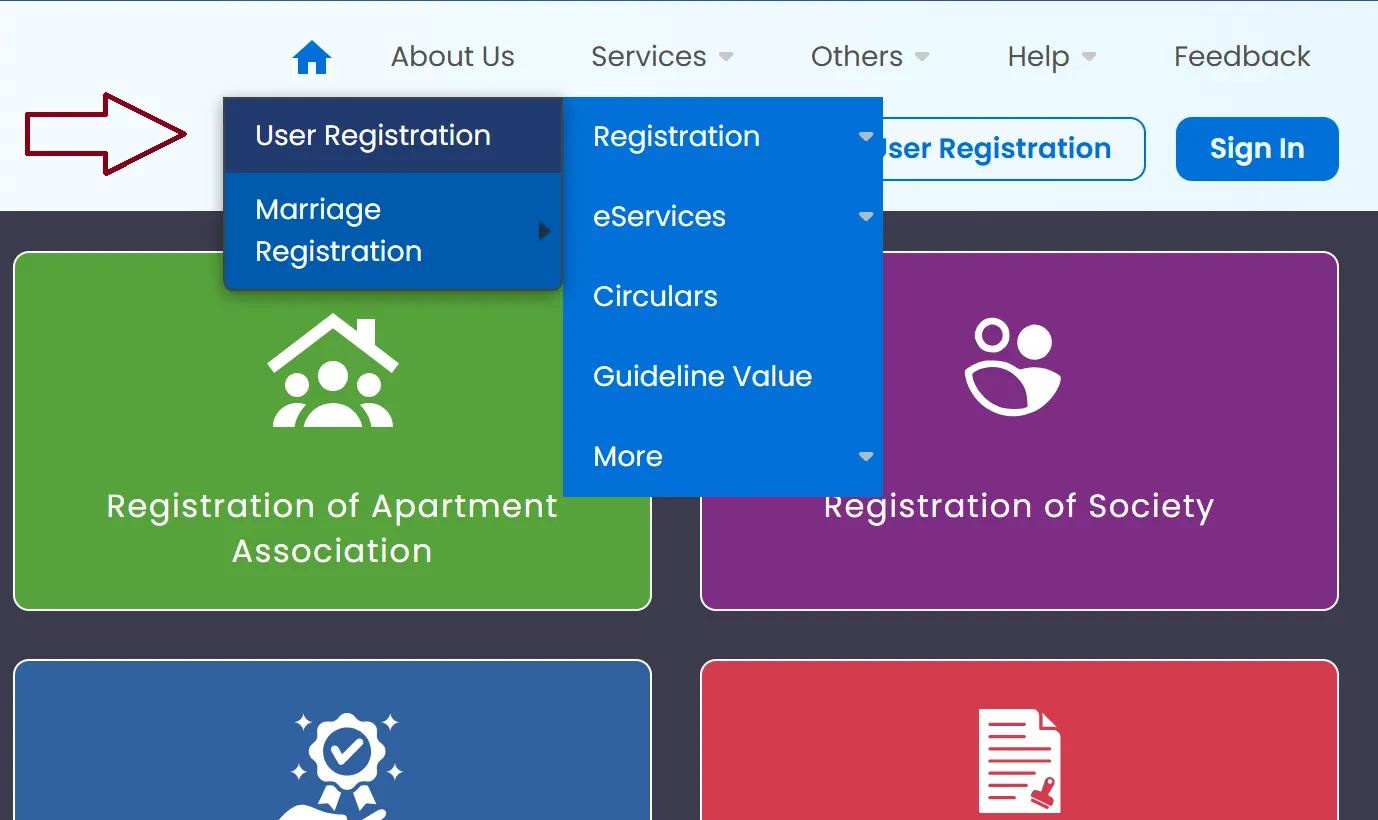
- Choose User Type: Select the appropriate category (e.g., Citizen, Advocate, Document Writer, or Firm).
- Enter Personal Details: Fill in your name, gender, email, date of birth, and mobile number.
- Provide ID Proof: You must select an identification type (like Aadhaar, PAN, or Voter ID) and enter the corresponding ID number.
- Set Credentials: Create a unique username and a strong password following the on-screen hints. Select a security question for future account recovery.
- OTP Verification: Enter the CAPTCHA and wait for the One-Time Password (OTP) sent to your registered mobile number and email.
- Complete Registration: Enter the OTP and click "Complete Registration" to activate your account.
| Rule | Requirement | Consequence of Failure |
|---|---|---|
| The 7-Day Rule | New users must use at least one registered service (like searching an EC or checking a status) within 7 days of account creation. | The User ID will be automatically deactivated. |
| The 3-Month Rule | Existing users must log in and perform at least one activity every 3 months from their last login. | The account will be deactivated due to inactivity. |
Identity Proofs Accepted
When registering, ensure you have a digital copy or the number of one of the following:
- Aadhaar Card
- PAN Card
- Voter ID
- Passport
- Driving License
Encumbrance Certificate (EC)
The Encumbrance Certificate (EC) is essentially a "health report" for your property. It tracks every registered transaction—such as sales, mortgages, or legal disputes— over a specific period to ensure the title is clear.
In 2026, the TNREGINET portal has made the process of viewing and obtaining these records almost entirely digital.
How to View/Download Online (Free)
If you simply want to check the history of a property for personal research, you can do so without paying a fee.
-
Navigate: Go to E-Services > Encumbrance Certificate > View EC.
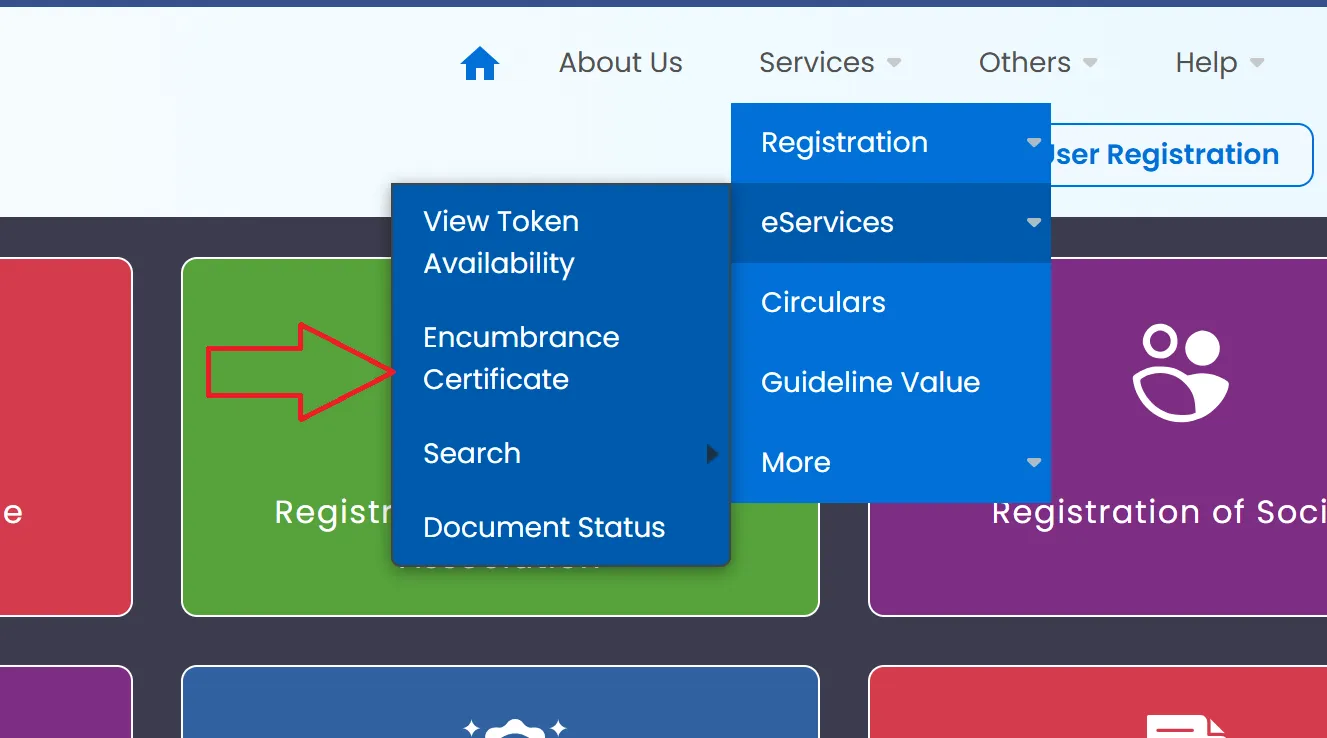
-
Select Search Type:
- EC Search: Enter the Zone, District, and Sub-Registrar Office (SRO). You will then need the Village, Survey Number, and Subdivision Number.
- Document-wise: If you have a specific deed, enter the Document Number, Year, and the SRO where it was registered.
-
Specify Period: Enter the start and end dates
(e.g., from 01-01-1975 to today).
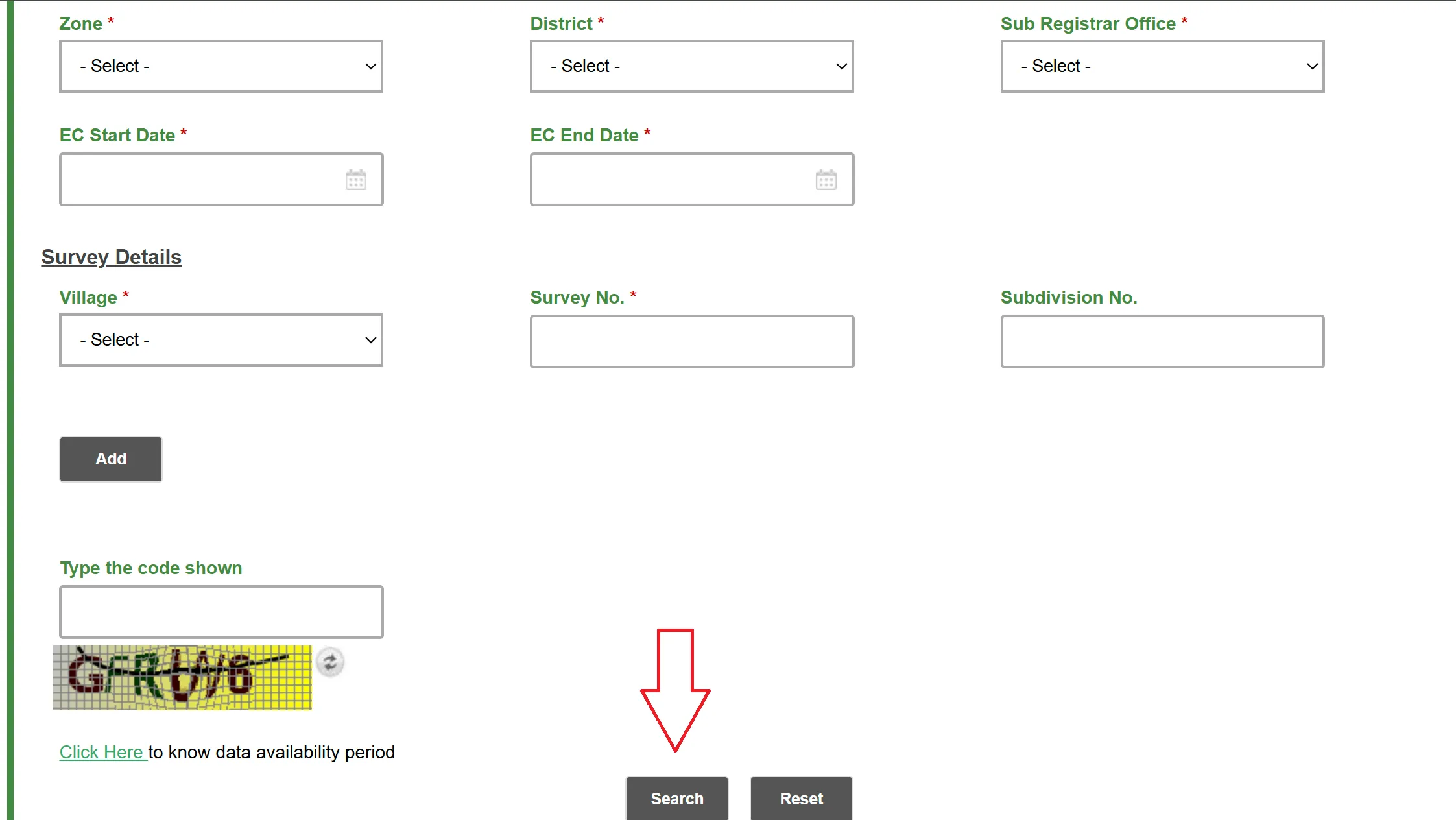
- View Results: After entering the CAPTCHA and clicking "Search", the portal will display a list of transactions. You can download this as a basic PDF for your reference.
Applying for a Digitally Signed (Certified) EC
For official purposes—like applying for a home loan, selling your property, or court proceedings—a free view is not enough. You need a Certified Copy (CC).
The Process: 1. Log in to your TNREGINET account. 2. Go to E-Services > Encumbrance Certificate > Search and Apply EC. 3. Enter the property details and the specific period you need (usually 13, 20, or 30 years). 4. Click Apply Online and proceed to the payment gateway.
Cost (Approx. 2026 Rates):
- Application Fee: ₹1
- Search Fee: ₹15 to ₹30 for the first year + ₹5 to ₹10 for each additional year.
- Computerization Fee: ₹100 (for records post-1987).
Processing Time: Once the Sub-Registrar verifies the records, the signed copy is usually uploaded to your account within 3 to 5 working days.
Verification & Security
Certified ECs in 2026 are highly secure to prevent fraud:
- Digital Signature: Look for the Sub-Registrar’s encrypted digital signature at the bottom of the PDF.
- QR Code: Every page features a unique QR code. You can scan this with your phone to instantly verify that the digital copy matches the original record on the government server.
EC Search Types
| Search Type | Best For... | Required Info |
|---|---|---|
| EC Search | Buyers checking a property's history. | Survey No, Sub-division No, Village. |
| Document-wise | Confirming a specific sale or gift deed. | Document No, Year, SRO Name. |
| Plot/Flat-wise | Multi-unit buildings or layouts. | Plot No, Flat No, Block No. |
Guideline Value & "Composite Valuation" (2026)
As of 2026, Tamil Nadu has moved significantly toward a Composite Value system for apartments. This includes the value of the building and the land (UDS) as a single rate.
| Region Type | Avg. Guideline Revision (July 2024–2026) | Primary Valuation Method |
|---|---|---|
| Urban (Chennai/Coimbatore) | ~10% Increase | Composite Value (Street-based) |
| Rural/Agricultural | Stable with minor local revisions | Square Feet / Acre based |
| Industrial Zones | 5%–10% Increase | Square Meter based |
Stamp Duty & Registration Fees (2026)
These are the taxes you pay to the government when transferring property.
Important Note: For 2025-2026, there is a 1% registration fee discount for women on properties valued up to ₹10 lakh.
Current Fee Structure
| Document Type | Stamp Duty | Registration Fee | Total Cost |
|---|---|---|---|
| Sale Deed (Male/General) | 7% | 4% | 11% |
| Sale Deed (Female - Up to ₹10L) | 7% | 3% | 10% |
| Gift Deed (Family Members) | 1% (Max ₹25k) | 1% (Max ₹4k) | Fixed Caps Apply |
| Partition (Family) | 1% (Max ₹25k) | 1% (Max ₹4k) | Fixed Caps Apply |
| Simple Mortgage | 1% (Max ₹40k) | 1% (Max ₹10k) | Low Cost |
Property & Life Event Registration
TNREGINET is no longer just a "land portal"—it has transformed into a comprehensive digital life-record system. In 2026, registering property or a major life event like a marriage is handled through a "Digital First" approach.
Property Registration:
Property registration in Tamil Nadu has been streamlined into a predictable online-to-offline process.
-
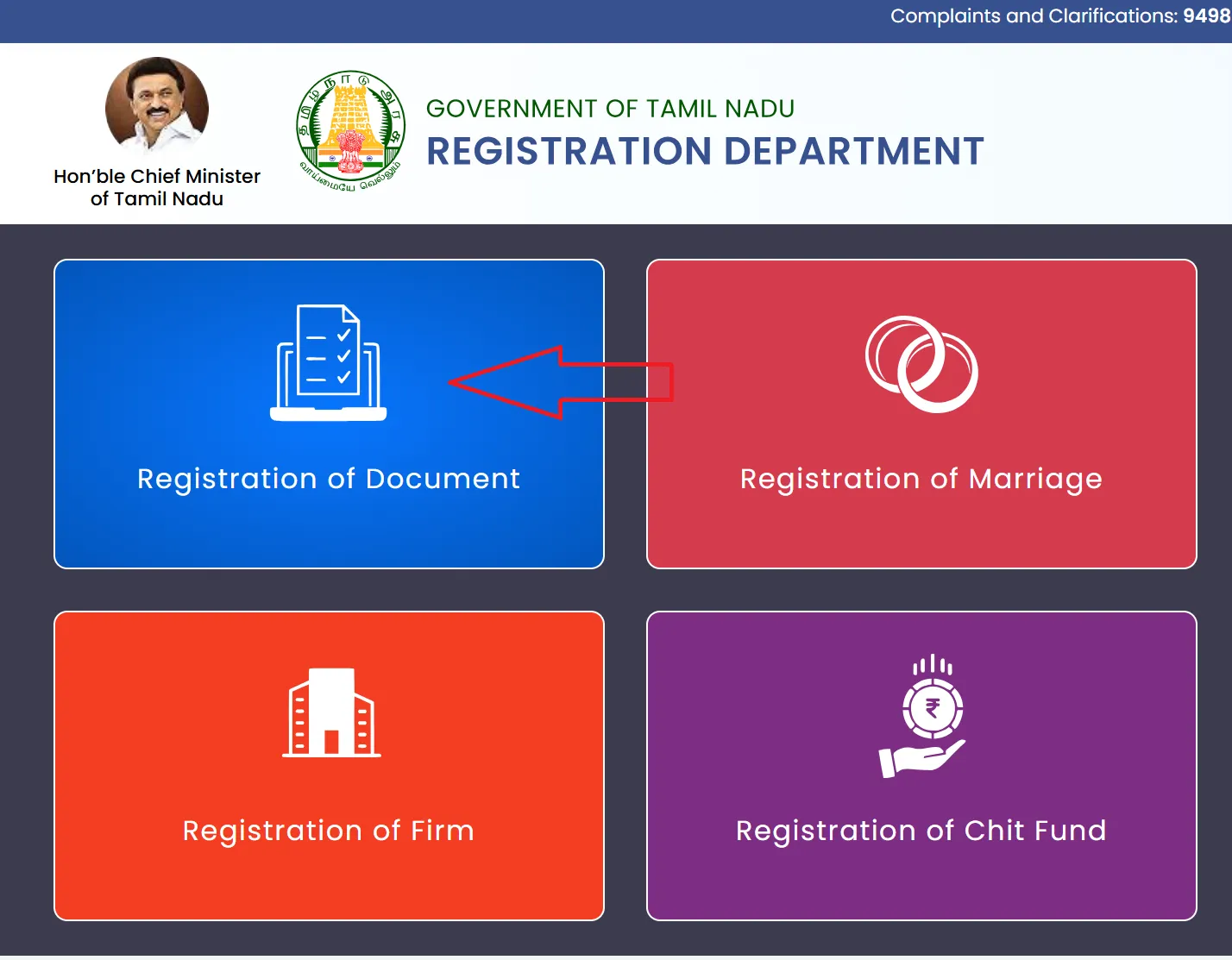
Drafting (Create Document): Log in to your account and select
Create Application > Create Document. You enter the details of the buyer, seller,
and property. The system generates a Draft Deed for you to review before it is officially submitted.
- Payment (e-Payment): Use the integrated calculator to find the exact Stamp Duty and Registration Fees. Payments are made via a secure gateway supporting Net Banking, UPI, and Credit Cards.
- Appointment (Token Booking): You don’t just show up at the office; you book a specific Time Slot (Token) under E-Services > View Token Availability. This ensures you are seen at a scheduled time, reducing wait periods at the Sub-Registrar Office (SRO).
-
Verification (The Final Visit): You must visit the SRO in person with:
- The original property documents.
- Aadhaar and PAN for all parties.
- Three witnesses (each with valid ID proof).
Marriage Registration (New 2025/2026 Rules)
Under the Tamil Nadu Registration of Marriages Act, online application is now the standard for both Hindu and Special Marriages.
- Hindu Marriage Act: Used when both parties are Hindu. Registration can be done within 30 days of the ceremony. You need a wedding invitation, temple/hall receipt, or an affidavit from the priest.
- Special Marriage Act: Used for inter-faith marriages. This requires a 30-day notice period where the intended marriage is published on the portal to allow for any objections.
Mandatory Documents:
- Passport-size photos of the couple.
- Age Proof: 10th Marksheet, Birth Certificate, or Passport.
- Witnesses: Three witnesses are required for the final registration visit.
Birth & Death Registration (2025 Updated Rules)
A major shift occurred in August 2025, modernizing how vital records are handled in Tamil Nadu.
| Feature | New Rule (2025/2026) | Old Rule (Pre-2025) |
|---|---|---|
| Certificate Format | Strictly Electronic (with QR for verification) | Physical paper copies |
| Delayed Registration | Tahsildar approval (for 30 days to 1 year) | Panchayat President approval |
| Data Format | Full names only (No abbreviations allowed) | Abbreviations were common |
| Reporting Period | Within 21 days (standard) | Within 21 days |
Tracking Your Application Status
Whether you have applied for an EC or a marriage certificate, you don't have to wait in the dark. The portal allows real-time tracking.
- For EC/Certified Copies: Log in and go to E-Services > Encumbrance Certificate > Request List. This will show if your application is "Pending," "Approved," or "Rejected."
- For Documents/Deeds: Go to E-Services > Document Status. Enter your temporary or permanent document number to see where it stands in the registration process.
- For Life Events: Use the Reference Number provided at the end of your application on the "Check Status" page for Marriage or Birth/Death registrations.
Specific Document Checklists (Sale vs. Gift)
Understanding exactly what to bring to the Sub-Registrar Office (SRO) prevents repeated visits.
For a Sale Deed
- Draft Deed: Prepared and uploaded on the portal.
- Original Title Deed: The seller's original document showing ownership.
- Patta/Chitta: Latest revenue records from the eservices.tn.gov.in portal.
- PAN & Aadhaar: Mandatory for both buyer and seller.
- Property Tax Receipt: The most recent payment proof.
- Stamp Duty Receipt: The e-payment acknowledgment from TNREGINET.
For a Gift Deed (Family)
- Relationship Proof: Documents proving the donor and donee are family (e.g., Birth Certificate, Ration Card) to claim lower stamp duty rates.
- Draft Gift Deed: Signed by the donor and accepted by the donee.
- Title Documents: Proof that the donor owns the property being gifted.
The Patta Chitta Connection
While TNREGINET handles the Registration (the legal transfer), the Revenue Department handles the Patta Chitta (the ownership record).
- The Link: Most property transactions on TNREGINET now trigger an automatic Patta Transfer request to the Revenue Department.
- Verification: You can check your land area and boundaries at eservices.tn.gov.in.
- Integration: In 2026, many SROs require the FMB (Field Measurement Book) sketch from the revenue site to be attached to the registration deed.
Contact Details
| Category | Contact Details & Channels |
|---|---|
| Phone Support |
General Queries: 9498452110 / 120 / 130 (Mon–Fri: 10 AM – 5:45 PM)
Technical Issues: 1800 102 5174 (Mon–Fri: 8 AM – 8 PM, Sat: 10 AM – 5 PM) |
| Digital & Offline |
Email: helpdesk@tnreginet.net
Address: No. 100, Santhome High Road, Chennai - 600028 |
FAQs
Is there any concession for women buyers in 2026?
Yes. For properties valued up to ₹10 lakh, women buyers receive a 1% discount on registration fees (paying 3% instead of the standard 4%). Note: This applies only if the property is registered solely in a woman’s name or jointly by multiple women.
What is the "Composite Value" system for apartments?
As of 2025-26, the government has officially adopted Composite Valuation. This means the stamp duty is calculated on the total value of the flat (including building and Undivided Share of land) rather than just the land, bringing the registered value closer to the actual market price.
Why does my EC search show "No Records Found"?
This usually happens if the property details (Survey No. or Subdivision No.) are typed incorrectly or if the records are pre-1975, as older records may not yet be digitized. For very old properties, you must visit the SRO for a manual search.
Does the Patta update automatically after property registration?
Yes, for most "Full Field" transactions (where an entire plot is sold), an Automatic Patta Transfer is triggered. However, if you are buying a subdivided part of a land, you must still apply manually via the Tamil Nilam portal.
How can I fix a spelling mistake in my online EC?
Minor clerical errors can be fixed by submitting a "Correction Request" through your logged-in dashboard. For major errors (like wrong ownership), you must visit the Sub-Registrar Office with your original Sale Deed to request a formal rectification.
What happens if my account gets deactivated?
If you don't log in for 3 months, your account is deactivated for security. You can typically reactivate it by using the "Forgot Password" link or by contacting the tech helpline at 1800 102 5174 to reset your profile status.